Shop Floor Execution

uShopFloor

From paper and confusion to clarity on the floor.

Many shop floor environments still rely on paper, disconnected tools or unclear instructions. uShopFloor translates planning into clear, executable tasks designed for gloves, noise and real environments. The interface is intentionally simple, so no training should be needed. Inline quality checks, material consumption, machine status and issue capture all happen on the screen the operator is already using, so planning and execution stay connected.

uShopFloor order dashboard with shift KPIs and queued and running order cards
Functionalities · 9
uShopFloor · Time Registration

Real-time. No paperwork later.

Start, pause, complete. Hours flow back into Business Central without anyone opening a different system. Time recorded in the moment is accurate. Time recorded at end-of-shift from memory is fiction, and so is the costing built on it.

Two-tap registration
Start a task: one tap. Complete it: one tap. Pause for a break: one tap. The operator never opens a second app to log time.
Anti-fudge defaults
A task running impossibly long flags. A task ending at "the same minute as the next one started" flags. Mistakes get caught right away, so they don't turn up at month-end.
Cost flows live to Business Central
Labour cost posts to the production order or job task as it happens, according to your Business Central settings. Costing is always current and based on real hours.
What you see

Accurate hours, with no extra work.

Time registration is usually the thing nobody wants to do, so it’s done badly, late or not at all. uShopFloor removes the friction, because the registration is the work. When you start a task on the screen, the system knows when. When you complete it, the system knows that too. Hours are correct by construction.

  • Start, pause, complete with single-tap actions
  • Automatic break detection (long pauses prompt the operator)
  • Setup, run and teardown time tracked separately
  • Multi-operator on the same task supported
  • Hours post live to Business Central production orders
  • Daily timesheet visible to the operator for review
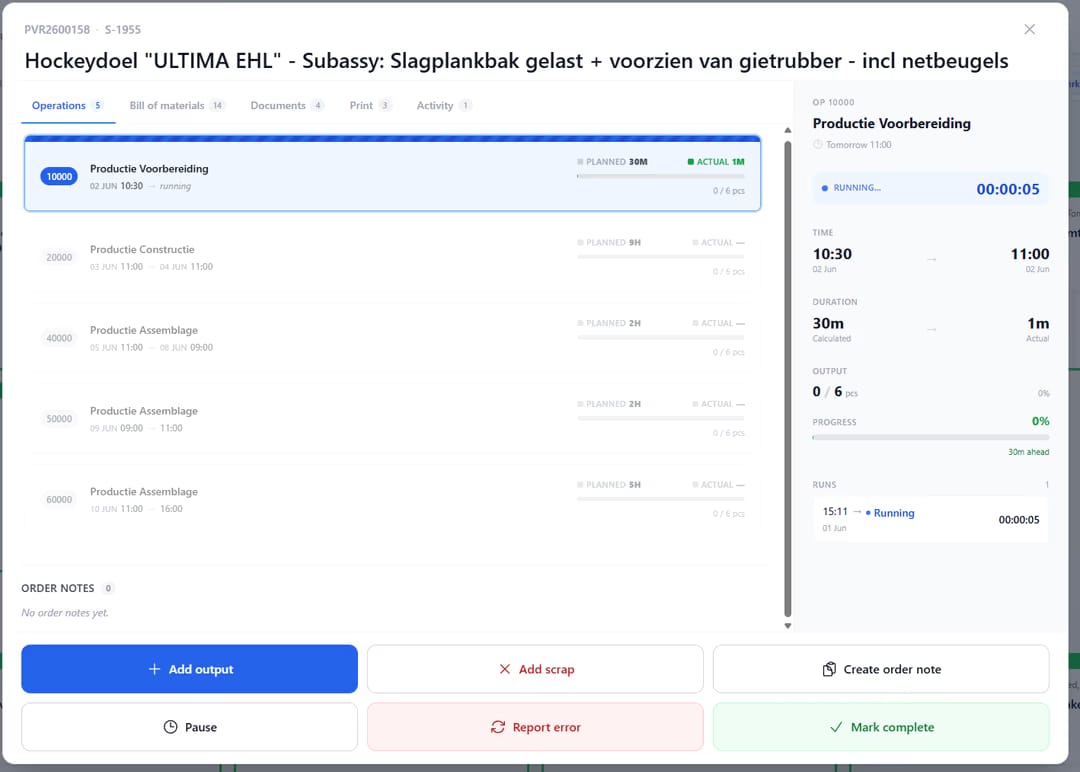
uShopfloor order detail screen for a production order, showing a list of six operations with planned versus actual time and output, a side panel timing the running "Productie Voorbereiding" operation with a live stopwatch, and action buttons to add output, add scrap, create an order note, pause, report an error, or mark complete.
When this matters

Signals you'd reach for this.

01
Timesheets are filled in on Friday
A Friday timesheet for the week is creative fiction. Costing built on it is approximate at best.
02
Pauses aren’t tracked
When a 6-hour task runs across a 30-minute lunch, the cost should reflect 5.5 hours of work. Without pause tracking, it doesn’t.
03
Setup time disappears into run time
When setup isn’t captured separately, costing systems can’t tell you which products are setup-heavy. Pricing is approximate.
04
Multi-operator work is misattributed
Two operators on a complex assembly should both clock the hours. Without multi-operator support, one of them disappears from the cost.
FAQ

The questions everyone asks first.

Still wondering? Ask us directly →

To the production order line the task came from. Business Central native posting; no proxy table.

See uShopFloor in a 30-minute demo.

A real screen-share with someone who built it. No slides.

The uTools suite

Other apps that pair well with uShopFloor