Shop Floor Execution

uShopFloor

From paper and confusion to clarity on the floor.

Many shop floor environments still rely on paper, disconnected tools, or unclear instructions. uShopFloor translates planning into clear, executable tasks designed for gloves, noise and real environments. The interface is intentionally simple — no training should be required. Inline quality checks, materials consumption, machine status and issue capture all happen on the same screen the operator is using anyway — so the loop between planning and execution stays closed.

uShopFloor order dashboard with shift KPIs and queued and running order cards
Functionalities · 9
uShopFloor · Task Board

The next task. Large. Obvious.

Workers see one task at a time, with everything they need to do it — materials, tools, drawing, expected time, target output. Anything else is a tap away, not in the way. The job of the screen is to answer "what do I do next?" in under a second.

The week, with a clear "you are here"
Workers see the full week of orders for their line, with a time-marker showing which is current and which is next. In settings, you can lock the order — the line of work stays the line of work, no random starts. Or leave it open if your floor needs the flexibility.
Everything in arm's reach
Drawing, instructions, materials list, tooling, expected time. All visible without scrolling. No "where do I find the work instruction?".
One primary action per state
Before you start, the big button says Start. While running, it says Complete. The flow has one decision at every step.
What you see

The screen as a teacher.

A new operator on the floor should be able to walk up to the screen and figure out what to do. The screen explains itself. The work instructions are where they should be. The drawing is full-screen on a tap. The materials list shows the bin location. It teaches the job while you do it.

  • Full-week overview of the line with a clear time-marker for current and next
  • Work instructions, drawings and SOPs inline
  • Materials list with bin location and required quantity
  • Tooling list with location
  • Expected time visible — and live elapsed time
  • Big primary action button, always at the bottom
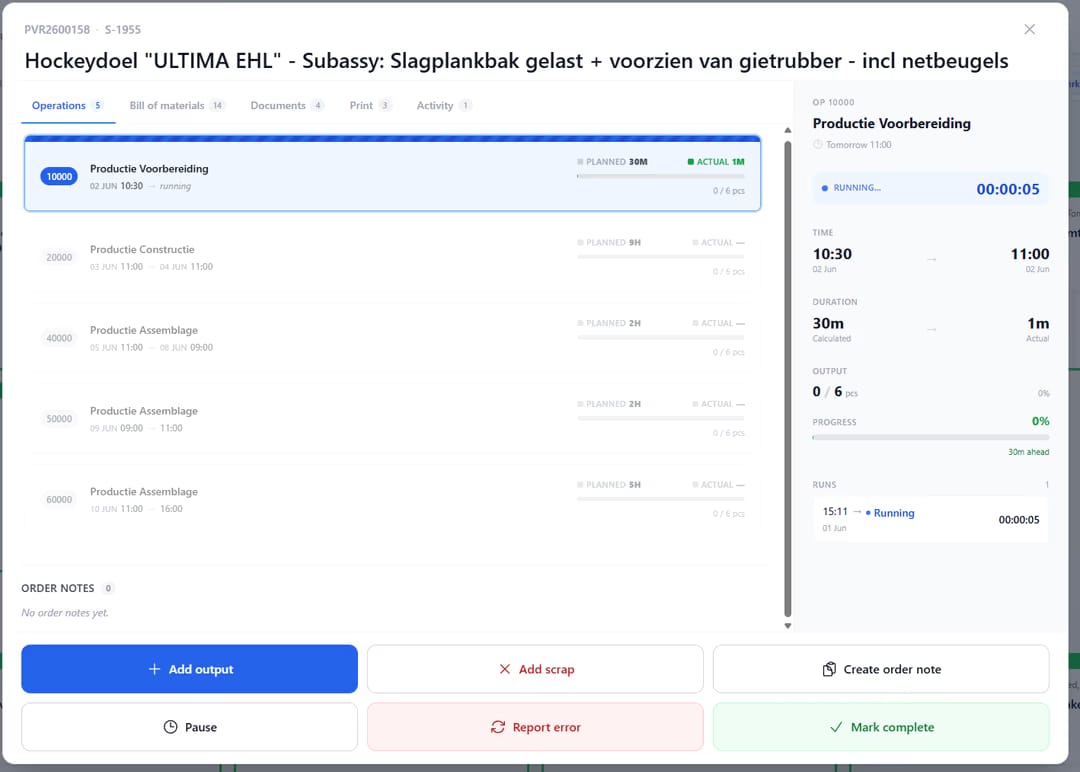
uShopFloor order detail with operation list, live run timer and output actions
When this matters

Signals you'd reach for this.

01
Operators ask "what is next?"
Whenever an operator has to ask a foreman what to do next, the system has not done its job.
02
Drawings are printed and outdated
When work instructions live on paper in a binder, they are out of date the moment a revision is issued. Live PDFs from Business Central are always current.
03
New operators take weeks
A floor where new hires are unproductive for two weeks is a floor where the screen is not explaining itself.
04
"Where is the work order?"
A question that should not exist. The screen is the work order.
FAQ

The questions everyone asks first.

Still wondering? Ask us directly →

Attached to the item, the routing, or the production order itself in Business Central — uShopFloor reads them all. Item- and routing-level instructions cover the standard work; production-order instructions handle the one-off notes that only apply to a specific order. Revisions flow automatically; no paper to swap out.

See uShopFloor in a 30-minute demo.

A real screen-share with someone who built it. No slides.

The uTools suite

Other apps that pair well with uShopFloor