Shop Floor Execution

uShopFloor

From paper and confusion to clarity on the floor.

Many shop floor environments still rely on paper, disconnected tools or unclear instructions. uShopFloor translates planning into clear, executable tasks designed for gloves, noise and real environments. The interface is intentionally simple, so no training should be needed. Inline quality checks, material consumption, machine status and issue capture all happen on the screen the operator is already using, so planning and execution stay connected.

uShopFloor order dashboard with shift KPIs and queued and running order cards
Functionalities · 9
uShopFloor · Quality Checks

Quality checked inline, at the workstation.

Inline quality checks at the moment they should happen, whether first-piece, in-process or final. The operator records measurements and photos and marks the result as pass or fail. Out-of-spec results route to QA without the operator having to know who QA is. It's built on Business Central's native quality management and uses the same setup, records and posting, so there's no parallel system to maintain.

Check at the right step
Quality checks attached to specific routing steps. The screen prompts at the right moment, before it's too late.
Photo and measurement capture
Measurement entry with min/max validation. Photo for visual checks. Both stamped with task and operator context.
Hold on out-of-spec
An out-of-spec result holds the task. QA gets a notification. The hold is released by QA, not the operator.
What you see

Quality checks on the line.

Inline quality checks happen at the moment they should, at first piece, in process and at the end. The operator captures measurements, photos and a pass or fail. Out-of-spec results route to QA without the operator having to know who QA is. It’s built on Business Central’s own quality management, so there’s no parallel system to maintain.

  • Quality checkpoints attached to routing steps
  • Measurement, observation and photo capture
  • Min/max validation with automatic out-of-spec flagging
  • Hold and release workflow with QA notification
  • Per-batch and per-piece check modes
  • Audit-ready trail: who measured, when, what tool
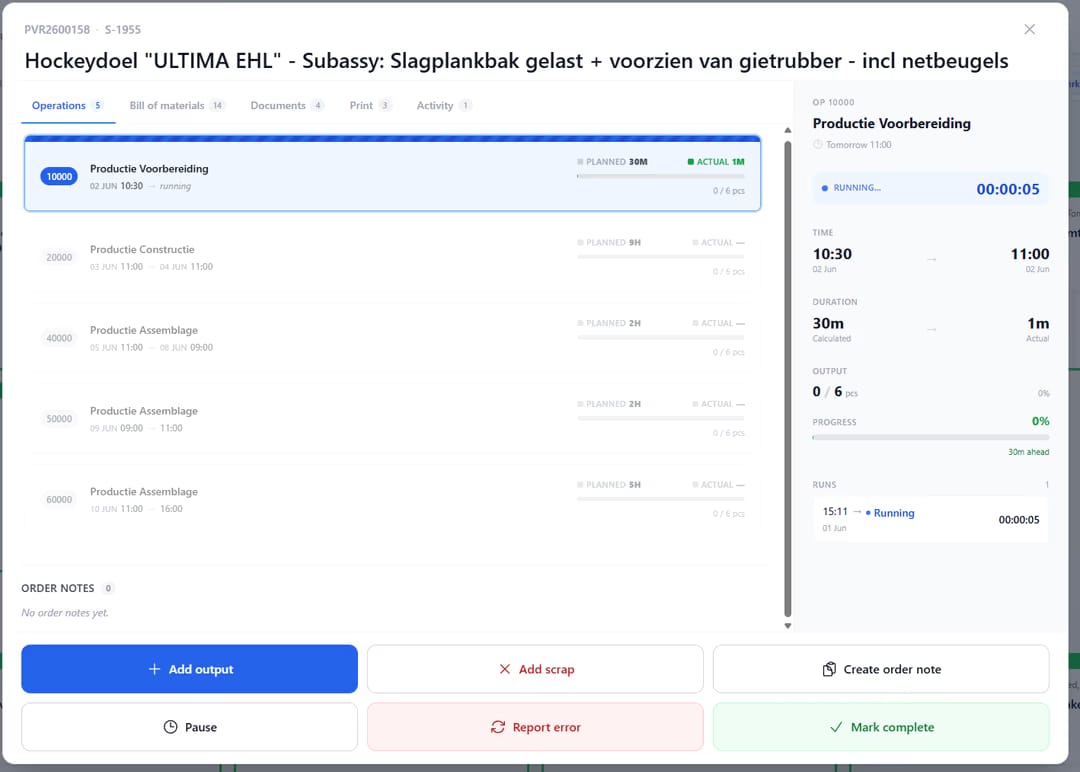
uShopfloor order detail screen for a production order, showing a list of six operations with planned versus actual time and output, a side panel timing the running "Productie Voorbereiding" operation with a live stopwatch, and action buttons to add output, add scrap, create an order note, pause, report an error, or mark complete.
When this matters

Signals you'd reach for this.

01
Quality is end-of-line
A part inspected at the end has cost everything before it. Inline checks find faults early.
02
Checks happen on a clipboard
Paper quality records don’t feed analytics. Digital from the start enables pattern detection.
03
Out-of-spec is handled informally
An operator who decides on their own to accept a borderline part is making a quality decision. That should be QA’s decision, with the record.
04
Audit prep is a fire drill
When ISO audits arrive, scrambling for quality records is normal. It shouldn’t be, because the records should already be there.
FAQ

The questions everyone asks first.

Still wondering? Ask us directly →

uShopFloor reads them directly. The inspection plan you set up in Business Central, with items, lots, frequency, sample size and test specs, is what the operator sees on the floor. No second setup and no exported spreadsheet.

See uShopFloor in a 30-minute demo.

A real screen-share with someone who built it. No slides.

The uTools suite

Other apps that pair well with uShopFloor