Shop Floor Execution

uShopFloor

From paper and confusion to clarity on the floor.

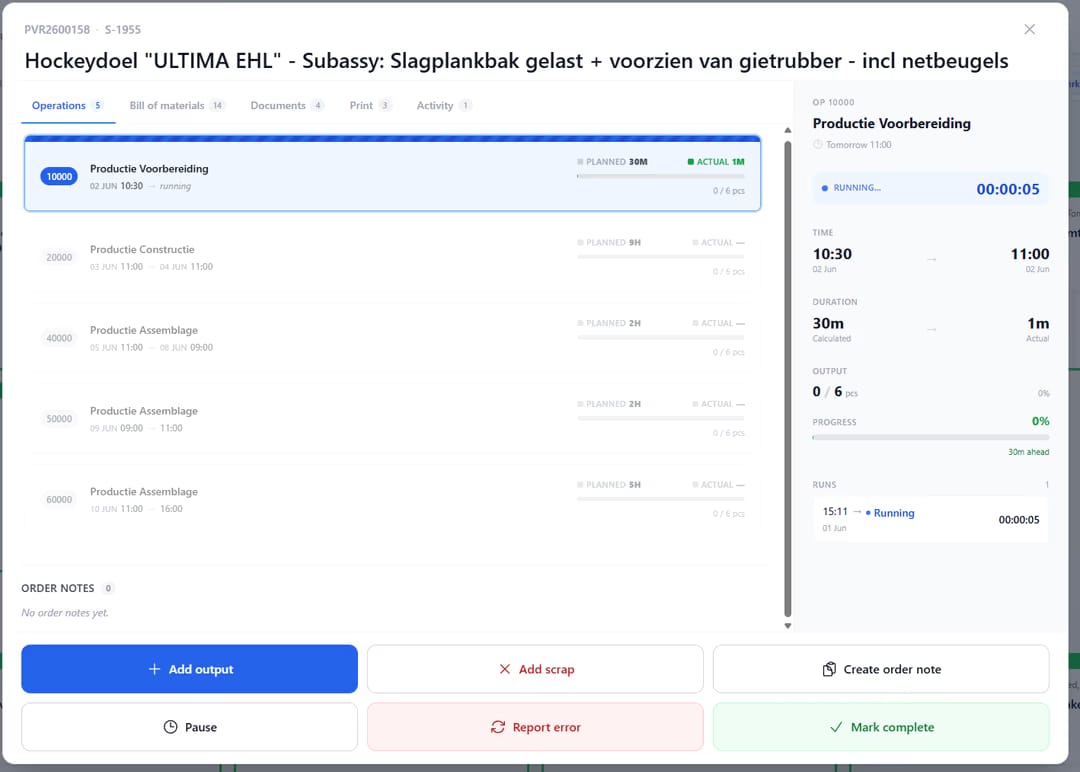
Many shop floor environments still rely on paper, disconnected tools, or unclear instructions. uShopFloor translates planning into clear, executable tasks designed for gloves, noise and real environments. The interface is intentionally simple — no training should be required. Inline quality checks, materials consumption, machine status and issue capture all happen on the same screen the operator is using anyway — so the loop between planning and execution stays closed.

uShopFloor order dashboard with shift KPIs and queued and running order cards
Functionalities · 9
uShopFloor · Overview

From planning to clear, executable tasks.

A shop-floor screen that requires zero training. What to do, in what order, with what materials. That is it. Everything else is either visible at the right moment or a single tap away.

Zero training
The screen tells you what to do. If you can read — or recognise a colour and a symbol — you can use it. Onboarding is "show up, look at the screen".
Real-time feedback
Time, progress, materials, issues — flowing back to planning the instant they happen. Planning sees execution, execution sees the plan.
Closed loop with Business Central
Time registrations, consumption, output and quality data all post directly to Business Central. No paperwork pile, no reconciliation step.
What you see

The interface assumes a real environment.

Most shop-floor software was designed by someone who has never stood next to a press, in gloves, with a forklift beeping in the background. uShopFloor was designed by people who have. Big targets, high contrast, big type, one decision at a time. It looks almost embarrassingly simple. That is the point.

  • One next task, large and obvious — not a list of fifty
  • Materials, tooling, drawings and instructions in one tap
  • Time and quantity registration in two taps
  • Issue reporting with photo, voice and predefined categories
  • Works on touch screens, ruggedised tablets, and standard PCs
  • Multilingual UI per worker
uShopFloor order detail with operation list, live run timer and output actions
When this matters

Signals you'd reach for this.

01
Paper still runs the floor
When the shift starts with a stack of printed work orders, the system has already failed. Paper drifts; screens stay current.
02
Floor workers refuse the new system
When floor software requires a session in a meeting room, adoption is uphill. Zero-training is a design property, not a slogan.
03
Time and quantity are entered hours later
A 16:00 batch entry of 8 hours of work is fiction. Real-time entry is the only entry that reflects reality.
04
Issues live in a notebook
A machine issue jotted on paper at 10:00 is forgotten by 15:00. Capturing it in the moment closes the loop.
FAQ

The questions everyone asks first.

Still wondering? Ask us directly →

Any modern browser — touch screens, ruggedised tablets (Zebra, Panasonic Toughbook), standard PCs. We also publish native apps on the Google Play Store and the Apple App Store, so a worker can run uShopFloor on a standard Android or iPad tablet without the browser in the way. No proprietary hardware, no lock-in.

See uShopFloor in a 30-minute demo.

A real screen-share with someone who built it. No slides.

The uTools suite

Other apps that pair well with uShopFloor