Shop Floor Execution

uShopFloor

From paper and confusion to clarity on the floor.

Many shop floor environments still rely on paper, disconnected tools or unclear instructions. uShopFloor translates planning into clear, executable tasks designed for gloves, noise and real environments. The interface is intentionally simple, so no training should be needed. Inline quality checks, material consumption, machine status and issue capture all happen on the screen the operator is already using, so planning and execution stay connected.

uShopFloor order dashboard with shift KPIs and queued and running order cards
Functionalities · 9
uShopFloor · Materials & Picking

Materials and bins, before the task starts.

When an operator opens a task, the materials are listed with suggested bins and quantities, plus the other bins where the same item is held in case the suggested bin runs short. Optionally, the screen tells the operator whether the order can start with what's currently in stock. All of it is driven by your Business Central setup, and we tune the behaviour to match how you work.

Materials list per task
Resolved from the BOM and routing. Quantity, lot or serial if required, the suggested bin, and the other bins where the item is also held. Inline with the task; not a separate screen.
Start-order check
Optional pre-flight check before an operator starts. The screen says yes or no based on whether the required materials are in stock at the permitted locations. You choose whether it just warns, blocks the start, or is switched off.
Force a pick moment
Lock the screen until the operator confirms the pick. The task can't proceed until materials are physically registered as picked. That's useful for plants that need a hard inventory moment before work starts.
Tuned to your setup
Bin policies, alternative bins, what counts as "enough to start" and lot rules are all read from Business Central. We adjust the screen behaviour to match how your plant runs.
What you see

Less hunting. Fewer stalled orders.

Two things waste time in materials. One is searching for parts that aren’t where someone thought they were. The other is starting an order that can’t finish because something is missing. uShopFloor solves both on the screen the operator is already using. The materials list shows the suggested bin and every other bin holding the item, and the optional start-order check tells the operator whether the parts are there before the timer starts. You can set the behaviour per work centre, per item and per plant.

  • BOM-resolved material list per task
  • Suggested bin plus other bins where the item is held
  • Optional start-order check against current stock
  • Choose whether it warns, blocks or stays off
  • Force-pick mode: lock the screen until materials are picked
  • Lot and serial visibility per your Business Central setup
  • All behaviour driven by your Business Central setup; we adjust to fit
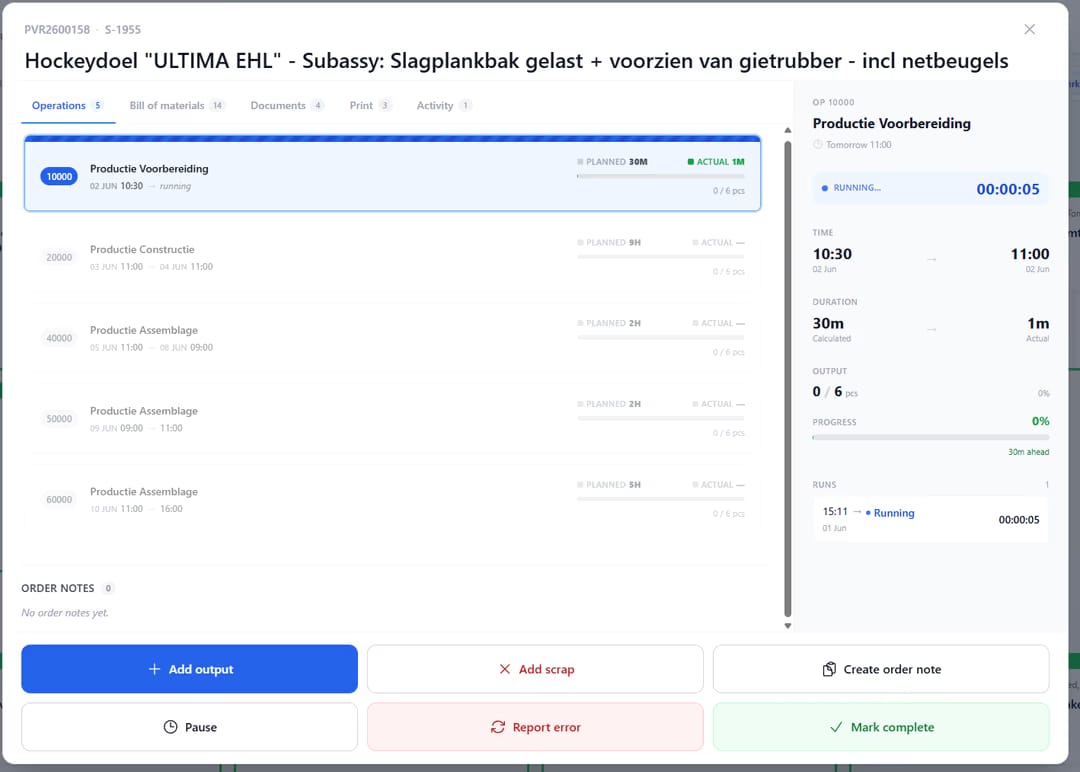
uShopfloor order detail screen for a production order, showing a list of six operations with planned versus actual time and output, a side panel timing the running "Productie Voorbereiding" operation with a live stopwatch, and action buttons to add output, add scrap, create an order note, pause, report an error, or mark complete.
When this matters

Signals you'd reach for this.

01
Operators hunt for parts
A task that doesn’t show bin location forces operators to ask the warehouse or walk the floor. Time lost is real money.
02
Orders start without materials
A job started without its parts stalls mid-shift. A pre-flight check catches it before the timer starts.
03
Bin policies live in someone’s head
When “we always go to bin A first, then bin C” is tribal knowledge, new operators take weeks. The screen should carry that policy.
04
The materials list is on a different screen
Switching apps to find what a task needs is friction the operator pays for, every task.
FAQ

The questions everyone asks first.

Still wondering? Ask us directly →

Whether the materials required by the BOM are present in stock at the locations your Business Central setup permits. You decide how strict it is. It can warn and still let the order start, block the start, or be switched off.

See uShopFloor in a 30-minute demo.

A real screen-share with someone who built it. No slides.

The uTools suite

Other apps that pair well with uShopFloor