Delivery, Project & Service Planning

uScheduler Project / Service / Sales

One plan, one reality — for everything after production.

For the phase after production: delivery, installation, service or project execution. Brings all outbound activities together into an intuitive overview, planned against capacity, skills, geography, deadlines and material availability. One thing we add: we also check whether the needed materials are available at that time of execution. Sales, logistics and engineers all read the same board — so promises get kept and surprises become rare.

uScheduler PSS image 1
Functionalities · 9
uScheduler P/S/S · Overview

Everything after production. In one plan.

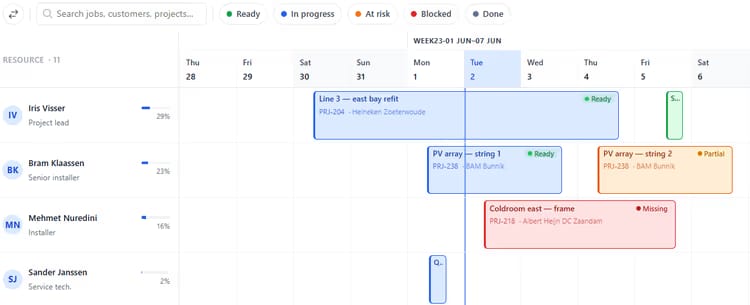
Deliveries, installations, services and projects on one visual board — with material availability and engineer qualifications checked before you commit a date. Sales, logistics and execution all work from the same reality.

One plan, three departments
Logistics deliveries, service jobs, project installations — usually three boards, three spreadsheets, three arguments. Here they live in one place.
Materials at execution time
When you slot an install, the system knows whether the parts will be on site that day — not just whether they are in the warehouse now.
Capacity and skills, together
An installer with the right ticket. An engineer with the right certificate. Capacity is more than hours; it is the right person with the right skill at the right time.
What you see

Stop juggling three planning spreadsheets.

Most companies plan production in one tool, deliveries in another, installations on a whiteboard, and projects in MS Project. The result is consistent miscommunication. uScheduler P/S/S merges the planning that happens after production into one canonical view — where every department sees the same dates and the same constraints.

  • Visual planning board for projects, services and sales deliveries
  • Material availability checked at execution time
  • Engineer skills, qualifications and certifications respected
  • Geographic routing optimisation for field activities
  • Efficiency dashboard: estimated vs. actual time, on-time delivery and first-time-fix
uScheduler PSS image 2
When this matters

Signals you'd reach for this.

01
The calendar lives in someone's head
Capacity for next week is whatever the planner remembers. New orders get promised against a picture nobody else can see.
02
Installs collide with deliveries
The same crew, the same truck, two different planners. Without one board, collisions are weekly.
03
Projects live in a separate universe
A project plan in MS Project that never talks to Business Central means slipping invoices and missed renewals.
04
Customers are surprised
A customer who finds out about a slip from the driver instead of from you loses trust that takes years to rebuild.
FAQ

The questions everyone asks first.

Still wondering? Ask us directly →

One app with three module flavours — Project, Service, Sales. You enable the ones you need. Customers often start with Service, add Sales delivery, then Project.

See uScheduler P/S/S in a 30-minute demo.

A real screen-share with someone who built it. No slides.

The uTools suite

Other apps that pair well with uScheduler P/S/S