Delivery, Project & Service Planning

uScheduler Project / Service / Sales

One plan, one reality — for everything after production.

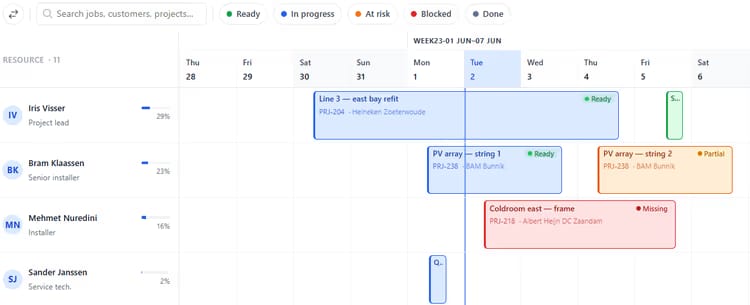
For the phase after production: delivery, installation, service or project execution. Brings all outbound activities together into an intuitive overview, planned against capacity, skills, geography, deadlines and material availability. One thing we add: we also check whether the needed materials are available at that time of execution. Sales, logistics and engineers all read the same board — so promises get kept and surprises become rare.

uScheduler PSS image 1
Functionalities · 9
uScheduler Project / Service / Sales · KPI Dashboard

The numbers a service operations manager lives by.

On-time start. First-time fix. Average response time. Estimated vs. actual time per job. Productive hours vs travel hours. Net bookable capacity for next 4 weeks. One screen, refreshed continuously, that tells operations whether the week is winning.

Scheduled customer messages
Confirmation when booked, a reminder the day before, an ETA the morning of, a done notification after — each a branded, editable template.
A portal with live status
Customers log in to see exactly where their order or project stands — scheduled, on the way, in progress, done. The same status the planner sees, without anyone having to relay it.
Confirm or reschedule, both ways
When you propose or move a date, the customer confirms or proposes an alternative in the portal. Confirmed dates flow back to the board; counter-proposals land as a planner activity.
What you see

Self-service is faster for everyone.

Customer communication is the cheapest part of operations to do well and the most expensive to do badly. A reminder costs nothing to send; a missed appointment costs a truck roll. And most status questions are answerable by data the planner already has — a portal turns “phone the planner” into “open the tab”. Planners get their time back; customers get an answer whenever they want one.

  • Configurable message templates per activity type
  • Customer messaging is a simple on/off switch — no per-customer setup
  • Scheduled messages: confirmation, reminder, ETA, completion
  • Customer portal scoped to their own orders and projects
  • Live status timeline with a confirm / counter-propose flow
  • Documents on the order — signed reports — visible to the customer
  • Writes back to Business Central; every message logged for the audit trail
Project planning board with jobs scheduled across engineers, showing material availability per job
When this matters

Signals you'd reach for this.

01
Reviews are anecdotal
A weekly review built on memorable bad events misses systemic ones. Numbers expose the system.
02
You find out at month-end
By the time the numbers land in a monthly report, the bad week is long gone. A live dashboard surfaces it while you can still act.
03
Estimates never meet reality
If you never compare quoted time to actual time, the same jobs keep getting under-quoted — and margin leaks one activity at a time.
04
Travel time is unmeasured
A team where 40% of paid hours are travel is a team where routing is broken. Without the measure, nobody fixes it.
FAQ

The questions everyone asks first.

Still wondering? Ask us directly →

Activity completions, time registrations and customer messages stream live. Aggregates refresh hourly by default; drill-downs are always current.

See uScheduler Project / Service / Sales in a 30-minute demo.

A real screen-share with someone who built it. No slides.

The uTools suite

Other apps that pair well with uScheduler Project / Service / Sales