Delivery, Project & Service Planning

uScheduler Project / Service / Sales

One plan for everything that happens after production.

Once production is done, there’s still delivery, installation, service and project work to plan. uScheduler P/S/S puts all of it in one overview and plans it against capacity, skills, geography, deadlines and material availability. It also checks whether the parts will be there on the day. Sales, logistics and engineers all look at the same board, so promises get kept and there are fewer surprises.

uScheduler P/S/S planning board with project and service orders scheduled across resources
Functionalities · 9
uScheduler Project / Service / Sales · Auto-plan

A plan that builds itself within the rules you set.

You decide what matters, such as which customers come first, which orders can't slip and what counts as idle time. Auto-plan reads those constraints and proposes a schedule. It fills gaps, calculates the earliest deliverable date and respects your priority hierarchy. The planner reviews and commits. It's fast on big boards, sensible on edge cases, and always shows what it changed.

Fill idle slots automatically
If a team, a vehicle or an engineer has free hours, Auto-plan spots them and fills them with the next job that fits. Idle time becomes earned hours without the planner shuffling tiles all afternoon.
Earliest delivery date, calculated
For any order on the board, "when can we deliver?" is a one-click answer. Auto-plan walks capacity, materials and routing to find the earliest realistic date.
Your priority hierarchy, respected
Build the rules once: certain customers always come first, certain order types never slip, certain regions get bundled. Auto-plan reads the hierarchy and plans within it. There's no black-box ranking, because every choice traces back to a rule you defined.
What you see

From “plan it manually” to “plan it for me”.

A planner spends hours each week doing what a rule engine can do in seconds: matching jobs to slots, finding the earliest fit, juggling priorities. Let Auto-plan handle the routine part, so the planner can focus on the decisions. Use it incrementally to fill the idle gaps, and the planner is always the one who commits.

  • Idle-slot detection across teams, engineers, vehicles
  • Earliest-delivery-date calculator per order
  • Customer, order and product priority hierarchies
  • Rule editor: who jumps the queue, who never moves
  • Full auto-plan: propose a week, planner reviews before commit
  • Incremental modes: fill only the idle gaps, or replan the whole board from scratch
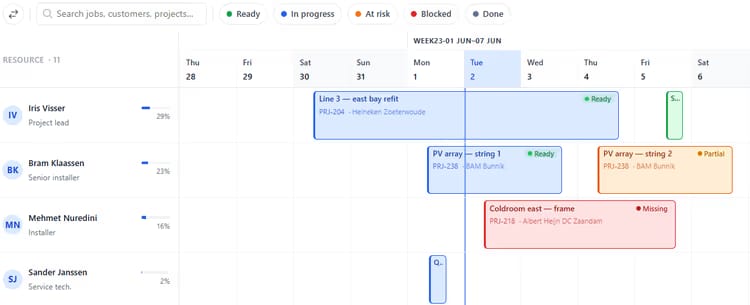
Project planning board with jobs scheduled across engineers, showing material availability per job
When this matters

Signals you'd reach for this.

01
“When can we deliver?” takes 20 minutes to answer
A simple sales question that means working through the board by hand to check materials and capacity is slow. Auto-plan turns it into a one-click answer.
02
Idle hours pile up without anyone noticing
A team that finishes early on Tuesday and sits until Wednesday morning is invisible to a busy planner. The engine sees every gap.
03
Priority is in someone’s head
When “customer X always comes first” lives only in the senior planner’s memory, juniors plan it wrong. A written hierarchy turns priority into a rule everyone can follow.
04
Every replan is a fresh fight
A material delay or a sick day means redoing the next four days by hand. Auto-plan replans in seconds with the same rules.
FAQ

The questions everyone asks first.

Still wondering? Ask us directly →

No. Auto-plan only proposes, and nothing changes until the planner says so. You review each suggestion and accept, edit or reject it. Run it across the whole board, or scope it to one team or one week.

See uScheduler Project / Service / Sales in a 30-minute demo.

A real screen-share with someone who built it. No slides.

The uTools suite

Other apps that pair well with uScheduler Project / Service / Sales