uScheduler Production
A production plan you can actually execute.
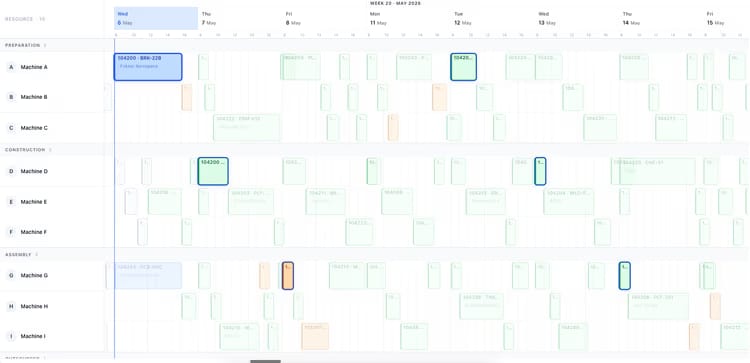
Most production planning tools draw beautiful Gantts that nobody can act on. In uScheduler Production, every cell on the board is a decision you can make. Drag an order and capacity, tooling, qualifications, sequencing and material availability all update instantly. If something doesn’t fit, you see it right away. Auto-Plan suggests a starting point and the planner fine-tunes it. Nothing changes on the floor until the planner commits. The result is a plan you can show on a screen above the line without explaining, and defend in a sales meeting when somebody asks “when can we ship it?”

The hours your floor works.
Shifts, breaks, holidays, planned maintenance, training time, summer hours. The calendar is where reality enters the plan, and where most planning systems quietly lose touch with it. uScheduler models all of it, per work centre and per operator.
The calendar is the contract.
Most “we missed the date” conversations end at “the calendar was wrong”. A planner committed to a Tuesday that the floor knew was a maintenance day. uScheduler makes the calendar something everyone shares. There’s one calendar, planning and the floor both look at it, and surprises become rare.
- Per work centre and per operator calendars
- Standard shift patterns: 1×8, 2×8, 3×8, 7×24, 4×10, custom
- Exception calendar: holidays, maintenance, training, retooling
- Forward visibility: holidays for the next 12 months
- Bulk edit: apply a holiday across all work centres in one action
Signals you'd reach for this.
See uScheduler Production in a 30-minute demo.
A real screen-share with someone who built it. No slides.