Production Planning

uScheduler Production

A production plan you can actually execute.

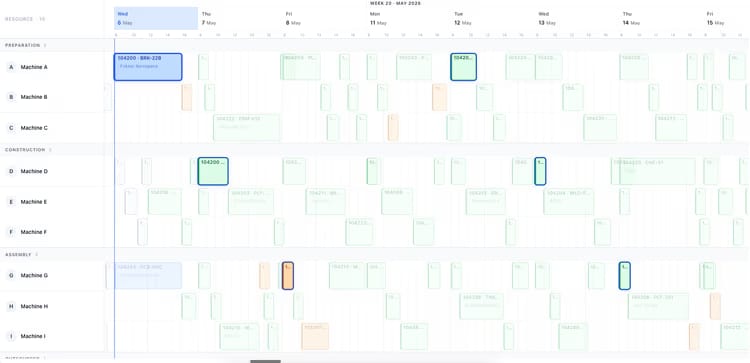
Most production planning tools draw beautiful Gantts that nobody can act on. uScheduler Production starts from the opposite premise: every cell on the board is a decision waiting to be made. Drag an order and capacity, tooling, qualifications, sequencing and material availability all update instantly — if something does not fit, it becomes visible. Auto-Plan proposes a feasible starting point; the planner refines it; nothing changes on the floor without the planner committing. The result is a plan you can show on a screen above the line without explaining, and defend in a sales meeting when somebody asks "when can we ship it?".

Production planning board showing work centers and scheduled orders for week 19
Functionalities · 8
uScheduler Production · Planning Board

The plan is the editor.

No separate edit mode, no separate capacity view. Drag an order, see the consequence, commit it. Capacity and material availability are visible wherever you are — so the conversation in your morning standup is the same conversation as the plan itself.

Drag, drop, recalculate
Move an order to another machine, another day, another shift — capacity, sequence and material checks update instantly. Conflicts surface where they happen.
Live consequence preview
Hover an order before dropping it. See what shifts, what slips, what frees up. Decide with the consequence visible, not after the fact.
A view tuned to each planner
Gantt or list, switched with one keystroke. Customise what you see: columns, groupings, colours, time horizon. Every planner saves their own default and opens where they left off.
What you see

A board that argues back.

When you drop an order somewhere infeasible, the board does not silently accept it. It tells you why — too little capacity, missing qualification, sequencing conflict, material not available. You decide what to do next: revert, ignore the warning with a note, or accept and let the downstream slip. The board records which one you chose.

  • Gantt and list views — one keystroke to switch
  • Capacity and material availability shown in-line on every view — no separate report
  • Inline reschedule with consequence preview
  • Multi-select for bulk moves
  • Saved views per planner — your default opens where you left off
Auto-plan menu: fill idle times, move to earliest possible date, move to just-in-time
When this matters

Signals you'd reach for this.

01
Drag-and-drop is fake
Tools that "support drag-and-drop" but commit silently or do not check feasibility are demoware. The check has to be live, or the gesture is meaningless.
02
You replan in your head
When the board cannot answer "what happens if I move this?", planners do the math mentally and the tool stops earning its keep.
03
Two views, two truths
A separate "current plan" and "proposed plan" almost always drift apart. One board prevents this.
04
The plan lives in Excel
When planners export to a spreadsheet to actually decide, the board is decoration. The real plan should live where the moves are made.
FAQ

The questions everyone asks first.

Still wondering? Ask us directly →

Under a second for typical mid-size catalogues (5k orders, 50 work centres). The check is incremental — only the affected window re-runs.

See uScheduler Production in a 30-minute demo.

A real screen-share with someone who built it. No slides.

The uTools suite

Other apps that pair well with uScheduler Production