Production Planning

uScheduler Production

A production plan you can actually execute.

Most production planning tools draw beautiful Gantts that nobody can act on. In uScheduler Production, every cell on the board is a decision you can make. Drag an order and capacity, tooling, qualifications, sequencing and material availability all update instantly. If something doesn’t fit, you see it right away. Auto-Plan suggests a starting point and the planner fine-tunes it. Nothing changes on the floor until the planner commits. The result is a plan you can show on a screen above the line without explaining, and defend in a sales meeting when somebody asks “when can we ship it?”

Production planning board with orders scheduled across ten machines over three days
Functionalities · 8
uScheduler Production · Overview

A production plan the floor can run.

Drag an order, drop it, and see straight away whether capacity and materials allow it. It's a plan you can put on a screen on the shop floor without explaining it, and one you can defend in a sales meeting when somebody asks "when can we ship it?".

From "what if?" to commit, in one click
Run Auto-Plan into a draft scenario, compare it against the current plan side-by-side, and commit when you're ready. The board never changes unexpectedly. Auto-Plan proposes, the planner commits.
Constraint-aware by default
The board takes every constraint into account, from capacity and tooling to qualifications, materials and sequencing. What you see is a plan you can actually run.
Visible bottlenecks
Busy days and conflicts are highlighted on the board, so you see bottlenecks a week ahead.
What you see

One board. One reality.

Most production planning tools draw beautiful Gantts that nobody can act on. uScheduler Production starts from the opposite premise: every cell on the board is a decision waiting to be made. The tool is there to help you decide, instead of just showing what already happened.

  • Visual planning board for production, capacity- and material-aware
  • Drag-and-drop with instant feasibility check
  • Auto-plan proposal as a starting point, you make the call
  • Tooling, qualifications and sequencing as first-class constraints
  • Material availability checked while you plan
  • Live KPIs: on-time completion, capacity utilisation, late orders
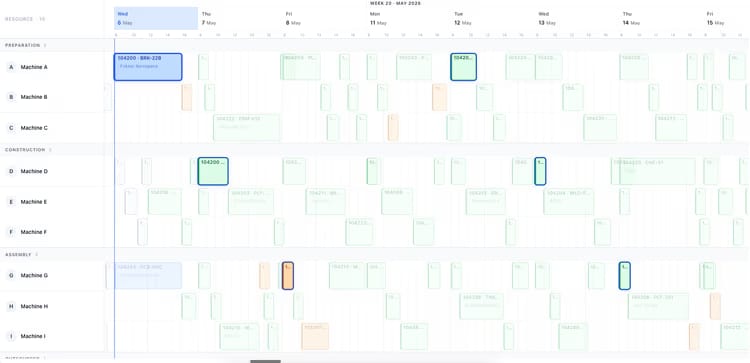
Production planning board showing two weeks of orders across ten machines
When this matters

Signals you'd reach for this.

01
Planning still lives in Excel
Business Central has the data. Excel has the plan. Every change requires a copy-paste round-trip nobody trusts.
02
Sales promises dates the floor can’t hit
Without capacity visibility at the moment of quoting, you ship dates that production discovers two weeks later.
03
Bottlenecks announce themselves on the day
A constraint that surfaces at 06:00 on Tuesday is a problem. A constraint that surfaces a week ahead is a plan.
04
Replanning takes half a day
When a customer asks “can you fit this in?”, you should have the answer in seconds.
FAQ

The questions everyone asks first.

Still wondering? Ask us directly →

Business Central produces planning lines. uScheduler Production gives you a visual, drag-and-drop board where every move is checked live for capacity and for whether the materials will be there when you need them. The math underneath is Business Central, and the board on top is built for the people who plan.

See uScheduler Production in a 30-minute demo.

A real screen-share with someone who built it. No slides.

The uTools suite

Other apps that pair well with uScheduler Production