Production Planning

uScheduler Production

A production plan you can actually execute.

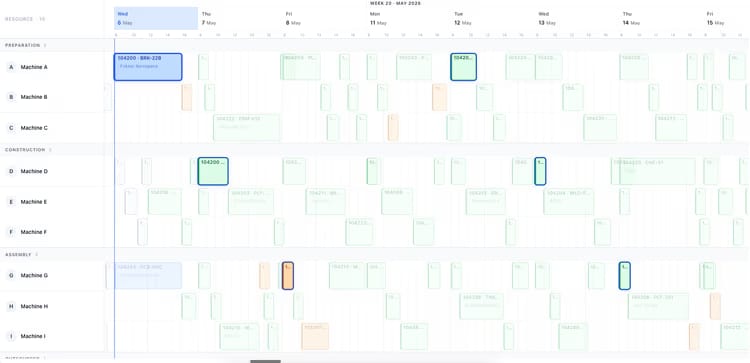
Most production planning tools draw beautiful Gantts that nobody can act on. uScheduler Production starts from the opposite premise: every cell on the board is a decision waiting to be made. Drag an order and capacity, tooling, qualifications, sequencing and material availability all update instantly — if something does not fit, it becomes visible. Auto-Plan proposes a feasible starting point; the planner refines it; nothing changes on the floor without the planner committing. The result is a plan you can show on a screen above the line without explaining, and defend in a sales meeting when somebody asks "when can we ship it?".

Production planning board showing work centers and scheduled orders for week 19
Functionalities · 8
uScheduler Production · Capacity Reservation

Leave room for the order you have not received yet.

There are always orders that arrive late and need to ship soon. A plan that fills every hour of every week has no answer when they land. uScheduler reserves capacity up front — more in the distant weeks, less as the week approaches — so the urgent order has somewhere to go and the rest of the plan does not collapse around it.

A buffer per work or machine centre
Set a percentage or a fixed number of hours per shift, per day or per week, on any work centre or machine centre. Auto-plan and feasibility checks treat the buffer as unavailable until you release it.
Fully adjustable
Different reservation levels per centre, per shift pattern, per season. Crank it up before peak season; relax it during quieter weeks. Changes take effect immediately.
Releases automatically as the week approaches
Reservation tapers by horizon. Two weeks out you might run at 80% planning capacity, one week out at 90%, the current week fully open. As each week rolls forward, the next horizon's reservation eases off automatically — no manual release.
What you see

You cannot plan to the max every week.

The instinct is to fill the schedule — every machine, every hour. But the week that runs at 100% utilisation is the week with no headroom for the rush order, the breakdown, the supplier slip. Reserved capacity is a planning choice, not a planning failure: a deliberate, visible buffer that turns "we cannot take that order" into "we have room".

  • Percentage or absolute reservation per work centre or machine centre
  • Per-shift, per-day or per-week granularity
  • Different levels per season, per centre, per shift pattern
  • Horizon-based tapering — e.g. 80% capacity two weeks out, 90% one week out, 100% in the current week
  • Reserved hours visible on the capacity view in their own colour
  • Reservation curve auto-rolls forward each week — no manual release
Auto-plan menu: fill idle times, move to earliest possible date, move to just-in-time
When this matters

Signals you'd reach for this.

01
Every rush order causes a replan
When the plan has zero slack, a single urgent order rewrites the week. Reserved capacity absorbs the shock.
02
"We cannot take that"
Sales is told no because the schedule looks full. Often it is full of low-priority work that should have moved aside.
03
Overtime is the buffer
A plant that runs at 100% planned and absorbs surprises with weekend work is using its people as the reservation system.
04
Utilisation theatre
100% planned utilisation looks great in the meeting and ships late in reality. Honest planning leaves room.
FAQ

The questions everyone asks first.

Still wondering? Ask us directly →

Auto-plan and the feasibility check treat reserved hours as zero capacity. The planner sees them as a distinct band on the board — they cannot be filled accidentally, only consumed deliberately.

See uScheduler Production in a 30-minute demo.

A real screen-share with someone who built it. No slides.

The uTools suite

Other apps that pair well with uScheduler Production