Production Planning

uScheduler Production

A production plan you can actually execute.

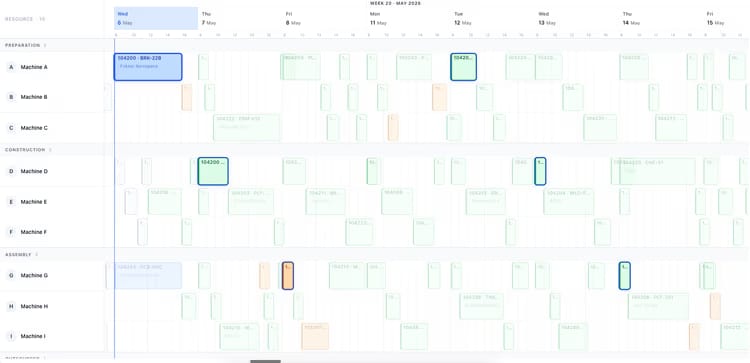
Most production planning tools draw beautiful Gantts that nobody can act on. uScheduler Production starts from the opposite premise: every cell on the board is a decision waiting to be made. Drag an order and capacity, tooling, qualifications, sequencing and material availability all update instantly — if something does not fit, it becomes visible. Auto-Plan proposes a feasible starting point; the planner refines it; nothing changes on the floor without the planner committing. The result is a plan you can show on a screen above the line without explaining, and defend in a sales meeting when somebody asks "when can we ship it?".

Production planning board showing work centers and scheduled orders for week 19
Functionalities · 8
uScheduler Production · Capacity & Material Availability

Capacity and parts, checked together.

A plan is only real if both the machine hours and the components line up on the day. uScheduler checks capacity and material availability in the same pass — at planning time, and every time you drag — so a move that would start without hours or without parts is flagged before it is committed.

Live capacity, in-line
Available hours versus committed hours on every view — work centre, machine centre, shift, day, week. Overload surfaces where it happens, not in a separate report. The capacity picture follows you across the app.
BOM-aware material check
Down to the BOM line. Every needed item, every needed quantity, every needed date — checked against on-hand stock, expected receipts and existing reservations. Shortages are named, with the missing component and the date.
Expected receipts respected
A PO due Tuesday means the material is available Tuesday — not before. The plan respects the receipt schedule, not just the current stock, so the warehouse never finds out at 06:00.
What you see

The two checks that decide whether a plan ships.

Capacity-only planning produces a clean schedule that the warehouse breaks at start-of-shift. Material-only planning ignores the bottleneck on the floor. Both have to be true at once: hours available, parts available, on the same day, on the same order. uScheduler treats them as one feasibility check — a move that violates either is flagged with the cause.

  • Capacity and material checked together on every drag and on every auto-plan run
  • Per work centre, per machine centre, per shift, per day load visualisation
  • BOM-aware material check at planning time — on-hand, receipts, reservations
  • Per-component shortfall report with proposed action (delay, substitute, expedite)
  • Holidays, planned maintenance and shift exceptions respected automatically
Auto-plan menu: fill idle times, move to earliest possible date, move to just-in-time
When this matters

Signals you'd reach for this.

01
Shortages discovered at 06:00
A plan that does not check materials is a plan that finds out at start-of-shift. The first hour is lost — and the customer date with it.
02
Capacity is a spreadsheet
A capacity report that lives in Excel is a snapshot of a moment that has already passed. Planning needs it live, next to the moves.
03
Plans assume infinite parts
Capacity-only tools schedule onto green machines with empty bins. The plan looks clean; the floor is angry.
04
Overload is discovered too late
A constraint that becomes visible on Monday morning is a Monday-morning crisis. Visible last week, it is a Tuesday move.
FAQ

The questions everyone asks first.

Still wondering? Ask us directly →

From the work-centre and machine-centre setup in Business Central — calendars, shift patterns, efficiency factors. uScheduler reads and respects them; you do not maintain two sets of data.

See uScheduler Production in a 30-minute demo.

A real screen-share with someone who built it. No slides.

The uTools suite

Other apps that pair well with uScheduler Production