Production Planning

uScheduler Production

A production plan you can actually execute.

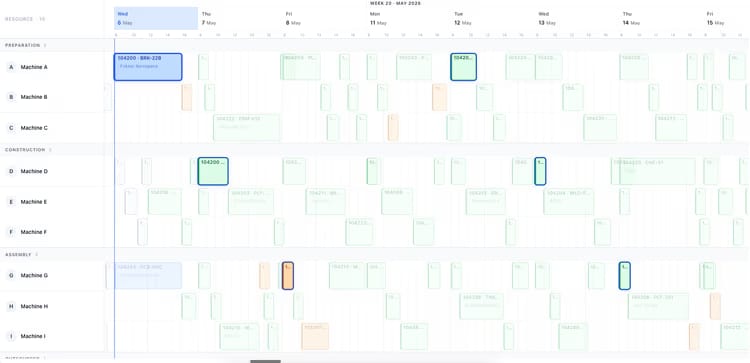
Most production planning tools draw beautiful Gantts that nobody can act on. uScheduler Production starts from the opposite premise: every cell on the board is a decision waiting to be made. Drag an order and capacity, tooling, qualifications, sequencing and material availability all update instantly — if something does not fit, it becomes visible. Auto-Plan proposes a feasible starting point; the planner refines it; nothing changes on the floor without the planner committing. The result is a plan you can show on a screen above the line without explaining, and defend in a sales meeting when somebody asks "when can we ship it?".

Production planning board showing work centers and scheduled orders for week 19
Functionalities · 8
uScheduler Production · Auto-Plan

Four ways to let the system propose.

Auto-Plan is not one button. It is four modes, each for a different planning question — pull dates in line with sales, push dates to the earliest feasible day, fill idle time on the floor, or rebuild the whole plan against a ranking you control. Every run produces a simulation. Nothing commits until you say so.

Move to JIT
Re-aligns production orders to the dates downstream demand actually needs them. When a sales order shifts out by a month, the production order follows — no manual chase to keep the two in sync.
Move to EPD
Earliest Production Date. You want to make it now; materials or capacity say not yet. The system finds the first day where both line up and moves the order there — honest dates instead of optimistic ones.
Fill idle-times
Spots gaps in the schedule — a machine quiet on Thursday afternoon, a shift under-loaded next week — and pulls eligible work forward to use them. Stock builders, MTS items and lower-priority orders earn their slot without breaking the plan downstream.
Auto-plan fully
After you configure how capacity and material availability are checked, and how production orders should be ranked — customer type, item type, make-to-order vs make-to-stock, priority, custom fields — the system runs a full simulation. Commit it, refine it, or discard.
What you see

A proposal. Never a verdict.

A fully-automated planner that commits its own choices is a planner that surprises you on Monday. We do not build that. Every Auto-Plan run produces a simulation side-by-side with the current plan — the planner sees what moved, what slipped, what improved, and chooses what to commit. The skill stays in the room.

  • Four modes: Move to JIT, Move to EPD, Fill idle-times, Auto-plan fully
  • Ranking rules: customer type, item type, MTO vs MTS, priority, and your own fields
  • Every run is a simulation — no silent commits
  • Per-planner saved configurations
  • Highly configurable — the defaults are sensible, the parameters are yours
Auto-plan menu: fill idle times, move to earliest possible date, move to just-in-time
When this matters

Signals you'd reach for this.

01
Sales moves, production does not
A customer pushes out by a month and the production order stays where it was. The mismatch lives in someone's inbox until shipment week.
02
Dates are optimistic, not honest
When you cannot move to the earliest feasible date in one click, the plan stays at the date you wanted, not the date you can hit.
03
Idle time goes unused
A quiet Thursday afternoon or an under-loaded shift next week is capacity nobody claimed. Without an explicit step to fill it, that time disappears.
04
Ranking is in someone's head
Which customer comes first, which order type to favour, when to prioritise MTS over MTO — the rules live in tribal knowledge until you encode them.
FAQ

The questions everyone asks first.

Still wondering? Ask us directly →

Move to JIT and Move to EPD are near-instant for the affected orders. A full Auto-Plan simulation runs in seconds for a single work centre and under a minute for a typical mid-size plant. Nothing commits until you accept the simulation.

See uScheduler Production in a 30-minute demo.

A real screen-share with someone who built it. No slides.

The uTools suite

Other apps that pair well with uScheduler Production