Production Planning

uScheduler Production

A production plan you can actually execute.

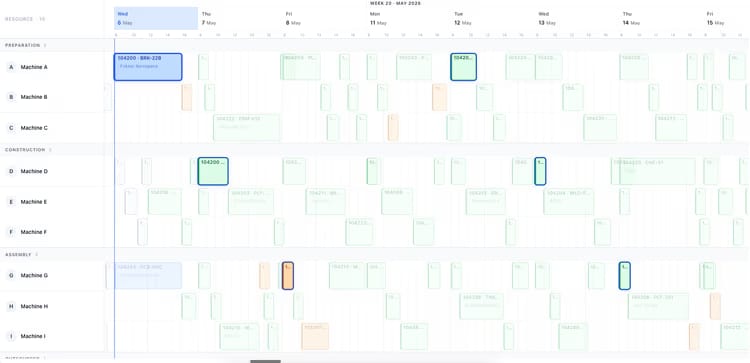
Most production planning tools draw beautiful Gantts that nobody can act on. uScheduler Production starts from the opposite premise: every cell on the board is a decision waiting to be made. Drag an order and capacity, tooling, qualifications, sequencing and material availability all update instantly — if something does not fit, it becomes visible. Auto-Plan proposes a feasible starting point; the planner refines it; nothing changes on the floor without the planner committing. The result is a plan you can show on a screen above the line without explaining, and defend in a sales meeting when somebody asks "when can we ship it?".

Production planning board showing work centers and scheduled orders for week 19
Functionalities · 8
uScheduler Production · Overview

A production plan you can actually execute.

Drag, drop, evaluate. Capacity-aware, constraint-aware, and visibly so. The kind of plan you can show on a screen on the shop floor without explaining — and the kind you can defend in a sales meeting when somebody asks "when can we ship it?".

From "what if?" to commit, in one click
Run Auto-Plan into a draft scenario, compare it against the current plan side-by-side, and commit when you're ready. The board never changes unexpectedly — Auto-Plan proposes; the planner commits.
Constraint-aware by default
Capacity, tooling, qualifications, materials, sequencing — every constraint feeds the board so the plan you see is the plan you can run.
Visible bottlenecks
Tight days light up. Conflicts surface where they live. You spot the squeeze a week ahead, not on the day.
What you see

One board. One reality.

Most production planning tools draw beautiful Gantts that nobody can act on. uScheduler Production starts from the opposite premise: every cell on the board is a decision waiting to be made. The job of the tool is to make that decision easier, faster, and obviously correct — not to render history in colour.

  • Visual planning board for production, capacity- and material-aware
  • Drag-and-drop with instant feasibility check
  • Auto-plan proposal as a starting point — never a verdict
  • Tooling, qualifications and sequencing as first-class constraints
  • Material availability checked live as you plan, not after
  • Live KPIs: on-time completion, capacity utilisation, late orders
Auto-plan menu: fill idle times, move to earliest possible date, move to just-in-time
When this matters

Signals you'd reach for this.

01
Planning still lives in Excel
Business Central has the data. Excel has the plan. Every change requires a copy-paste round-trip nobody trusts.
02
Sales promises dates the floor cannot hit
Without capacity visibility at the moment of quoting, you ship dates that production discovers two weeks later.
03
Bottlenecks announce themselves on the day
A constraint that surfaces at 06:00 on Tuesday is a problem. A constraint that surfaces a week ahead is a plan.
04
Replanning takes half a day
When a customer asks "can you fit this in?", the answer should be in seconds, not after lunch.
FAQ

The questions everyone asks first.

Still wondering? Ask us directly →

Business Central produces planning lines. uScheduler Production produces a visual, drag-and-drop board where every move is feasibility-checked live — not just whether you have the capacity to make it, but whether the materials will be available at the moment you actually need them. The math underneath is Business Central; the surface is built for humans.

See uScheduler Production in a 30-minute demo.

A real screen-share with someone who built it. No slides.

The uTools suite

Other apps that pair well with uScheduler Production