Inventory & Purchasing

uPurchase

Demand forecasting and purchasing, in one screen.

uPurchase is the demand-forecasting and inventory-intelligence layer Business Central never had. It classifies every SKU, forecasts demand by location, sizes safety stock against a chosen service level, applies supplier calendars and lead times, weighs carrying cost against stockout risk — and then turns the whole picture into concrete, explainable purchase suggestions. Every recommendation answers the question "why" before you have to ask it: the forecast, the safety stock, the lead time and the current position all live on the same row as the quantity. Edit any number and the projected stock curve updates before anything is committed to Business Central. Purchasers get to challenge the numbers instead of trusting them blind, and controllers see service level, stockouts and excess as daily KPIs rather than monthly autopsies.

uPurchase demand chart with historical, future and forecast curves
Functionalities · 10
uPurchase · Stock Health

Excess, slow-movers, dead stock — surfaced before they hurt.

Inventory has a half-life. uPurchase identifies items that are above target, slowing down, or stopped — and proposes specific actions: stop ordering, promote, transfer, write down. The carrying cost of doing nothing is shown next to each item.

Three health states, clear rules
Excess (above target service level), slow-mover (no movement in N days), dead (zero movement, no forecast). Thresholds are yours; the categorisation is automatic.
Cross-reference with substitution
Dead stock often has live substitutes elsewhere in your catalogue. The page flags items where an alternative SKU has demand and stock issues — so you can route customers to the replacement, free up the obsolete stock, and stop ordering both.
Cost of doing nothing
The carrying cost per month is shown for every flagged item. The total at the top of the page is what this conversation is worth.
What you see

A dashboard with consequences.

Most "obsolete stock" reports are read once a year and ignored. uPurchase puts stock health on the daily workspace and attaches a cost figure to each row. When the cost of doing nothing is visible, decisions get made — and the list shrinks.

  • Excess threshold: stock above N × target service level
  • Slow-mover threshold: configurable days since last movement
  • Dead-stock threshold: zero movement AND zero forecast
  • Transfer suggestions to locations where the item is still moving
  • Trend per item — getting worse, recovering or flat over the last 90 days
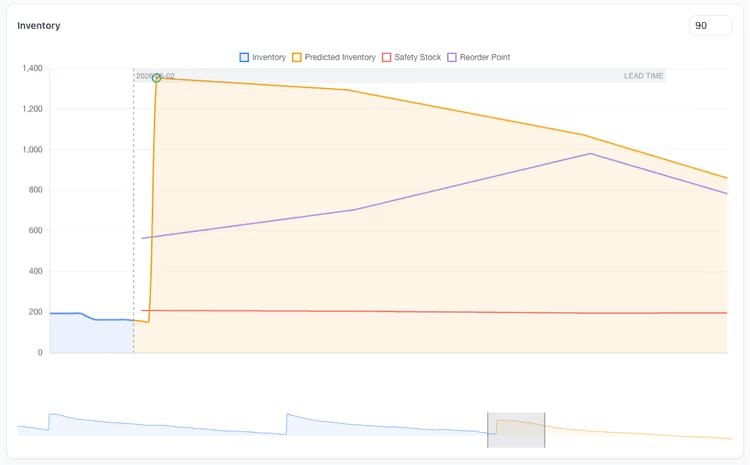
uPurchase predicted inventory against safety stock and reorder point
When this matters

Signals you'd reach for this.

01
Year-end surprises in the audit
Obsolescence provisions appear once a year. By then the cash is long gone.
02
Items in two warehouses, sold in one
Inter-branch transfer is "too much work" so the slow side carries dead stock and the fast side restocks externally.
03
Discontinued items keep reordering
Without an end-of-life class, last year's discontinued SKU still triggers MRP. The lot arrives. Nobody wants it.
04
End-of-life isn't a status anyone sets
An item that's been replaced or sunsetted keeps the same item card it always had. Without a clear end-of-life flag, the suggestion engine treats the last fifty units as if they'll move — and the dead stock never gets formally retired.
FAQ

The questions everyone asks first.

Still wondering? Ask us directly →

Excess is measured against the item's own policy, not a flat number. A stock level above the target service-level cover for the class is flagged; an item at exactly the policy cover is not. So a deliberate strategic buffer doesn't show up as a problem.

See uPurchase in a 30-minute demo.

A real screen-share with someone who built it. No slides.

The uTools suite

Other apps that pair well with uPurchase