uPurchase
Demand forecasting and purchasing, in one screen.
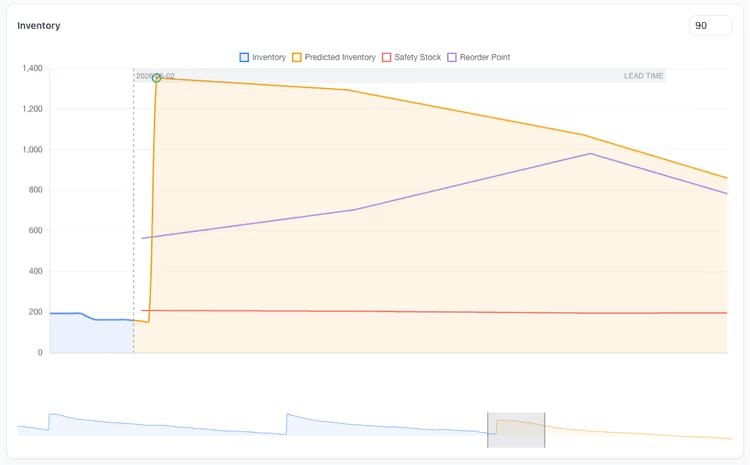
uPurchase is the demand-forecasting and inventory-intelligence layer Business Central never had. It classifies every SKU, forecasts demand by location, sizes safety stock against a chosen service level, applies supplier calendars and lead times, weighs carrying cost against stockout risk, and turns it all into purchase suggestions. Every recommendation answers the question “why” before you have to ask it: the forecast, the safety stock, the lead time and the current position all live on the same row as the quantity. Edit any number and the projected stock curve updates before anything is committed to Business Central. Purchasers get to challenge the numbers instead of trusting them blind, and controllers see service level, stockouts and excess as daily KPIs rather than monthly autopsies.

ABC, XYZ, and the policy that follows.
Not every item deserves the same attention. uPurchase classifies your catalogue by revenue contribution (ABC) and by demand variability (XYZ), then applies the right policy automatically. AX items get tight service levels and CZ items get simpler rules, without anyone babysitting them.
The 9-box that runs the buy.
One axis scores revenue contribution, the other scores how much demand varies, which gives you nine boxes. AX in the top-left runs your business, so it gets a tight service level and frequent reviews. CZ in the bottom-right is the long tail, so simple rules and a lower service level are enough. Each box has its own policy, so you set the rules once per class.
- ABC based on revenue, units sold or gross margin, whichever you choose
- XYZ based on the demand coefficient of variation over the chosen horizon
- Per-class service-level target, review cycle, and safety-stock model
- Items moving class flagged in a "transition" view, with the reason
- Class shown on every suggestion so a purchaser knows the stakes
Signals you'd reach for this.
See uPurchase in a 30-minute demo.
A real screen-share with someone who built it. No slides.