uPurchase
Demand forecasting and purchasing, in one screen.
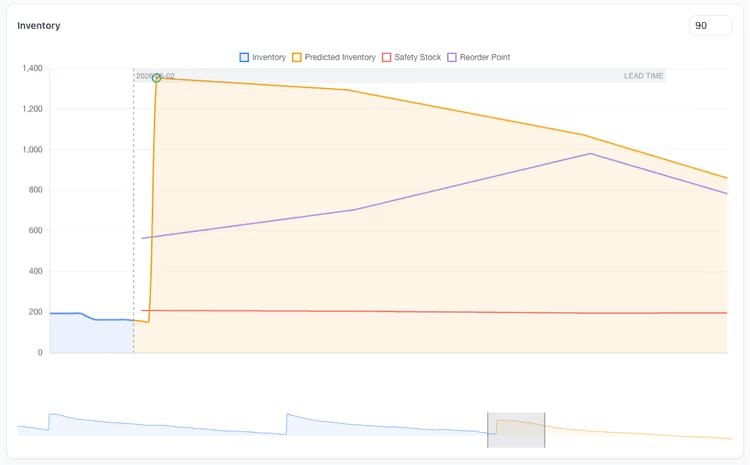
uPurchase is the demand-forecasting and inventory-intelligence layer Business Central never had. It classifies every SKU, forecasts demand by location, sizes safety stock against a chosen service level, applies supplier calendars and lead times, weighs carrying cost against stockout risk, and turns it all into purchase suggestions. Every recommendation answers the question “why” before you have to ask it: the forecast, the safety stock, the lead time and the current position all live on the same row as the quantity. Edit any number and the projected stock curve updates before anything is committed to Business Central. Purchasers get to challenge the numbers instead of trusting them blind, and controllers see service level, stockouts and excess as daily KPIs rather than monthly autopsies.

Inventory and purchasing, finally legible.
uPurchase replaces lines of MRP and MPS output with concrete, explainable purchase suggestions. Every recommendation answers the question "why" before you have to ask it, and lets you challenge it, adjust it, and watch the impact ripple through your stock position in real time.
A suggestion list with the reasoning attached.
You see how urgent each line is and why it’s suggested, adjust the quantity if needed, and approve. The defaults are usually right because they are built from your real consumption. When a default is wrong, you change it in one click. The system records it, so next time the model can learn that pattern.
- Concrete order suggestions per SKU per supplier
- Demand forecast, safety stock, lead time and current stock visible on every row
- ABC/XYZ classification so different items get different policies
- Service-level targets per class, with carrying cost made visible
- What-if scenarios save before you commit anything
- Daily KPI feedback: service level achieved, stockouts avoided, excess avoided
Signals you'd reach for this.
See uPurchase in a 30-minute demo.
A real screen-share with someone who built it. No slides.