Shopfloor-Ausführung

uShopFloor

Von Papier und Verwirrung zu Klarheit in der Fertigung.

Viele Fertigungsumgebungen arbeiten noch mit Papier, unverbundenen Tools oder unklaren Anweisungen. uShopFloor übersetzt die Planung in klare, ausführbare Aufgaben, gemacht für Handschuhe, Lärm und echte Arbeitsumgebungen. Die Oberfläche ist bewusst einfach, damit keine Schulung nötig sein sollte. Prozessbegleitende Qualitätsprüfungen, Materialverbrauch, Maschinenstatus und das Melden von Problemen passieren alle auf dem Bildschirm, den der Werker ohnehin benutzt, so bleiben Planung und Ausführung verbunden.
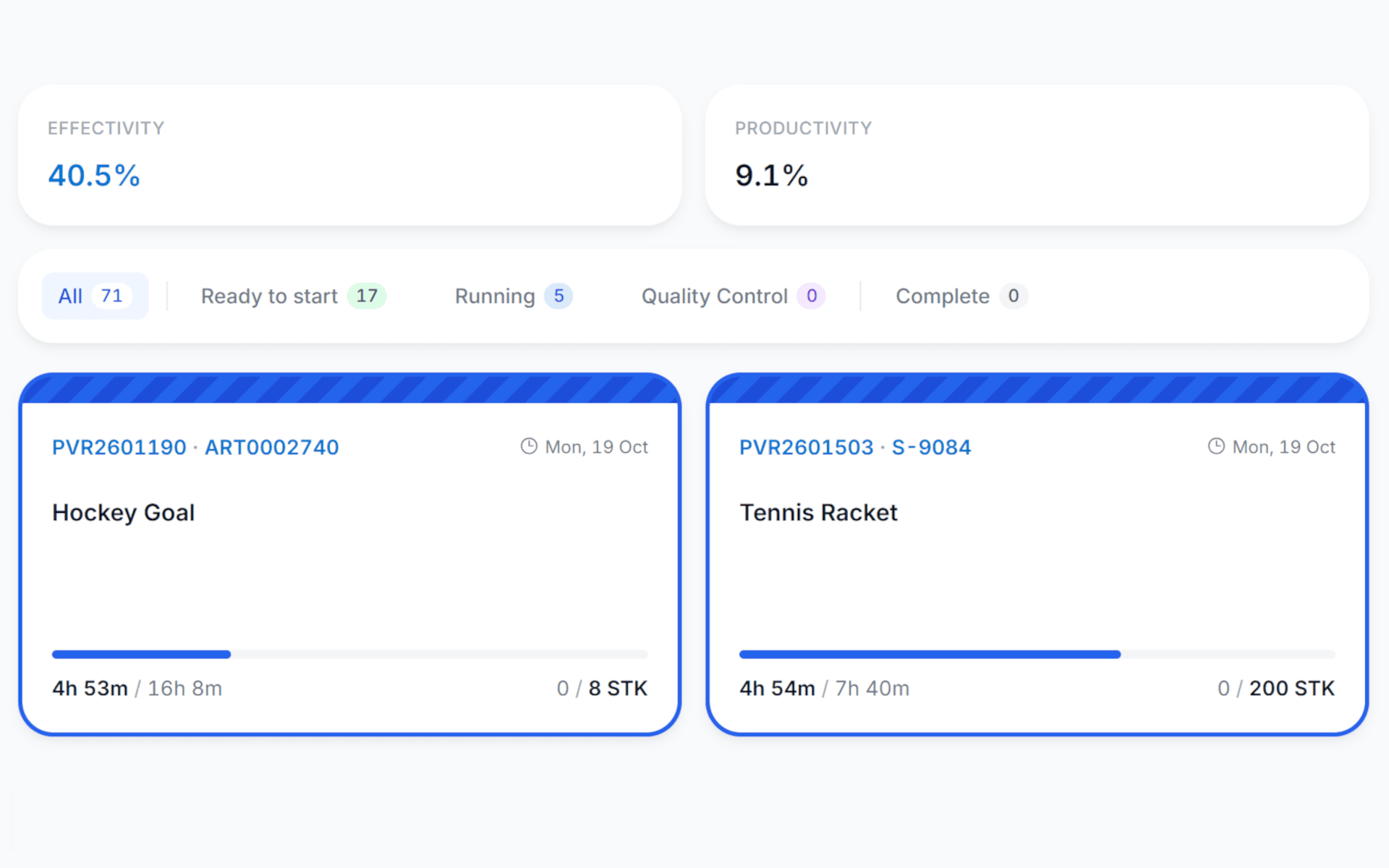
uShopFloor order dashboard with effectivity and productivity, a filter by order status and cards for the running production orders with time and quantity progress
Funktionen · 9
uShopFloor · Overview

From planning to clear, executable tasks.

A shop-floor screen that needs no training. What to do, in what order, with what materials. That's it. Everything else is either visible at the right moment or a single tap away.

Zero training
The screen tells you what to do. If you can read, or recognise a colour and a symbol, you can use it. Onboarding is "show up, look at the screen".
Real-time feedback
Time, progress, materials and issues flow back to planning the instant they happen. Planning sees execution, execution sees the plan.
Closed loop with Business Central
Time registrations, consumption, output and quality data all post directly to Business Central. No paperwork pile, no reconciliation step.
Was du siehst

The interface assumes a real environment.

Most shop-floor software was designed by someone who has never stood next to a press, in gloves, with a forklift beeping in the background. uShopFloor was designed by people who have. Big targets, high contrast, big type, one decision at a time. It looks almost embarrassingly simple. That is the point.

  • One big, clear next task, so nobody has to dig through a long list
  • Materials, tooling, drawings and instructions in one tap
  • Time and quantity registration in two taps
  • Works on touch screens, ruggedised tablets, and standard PCs
  • Issue reporting with photo, voice and predefined categories
  • Multilingual UI per worker
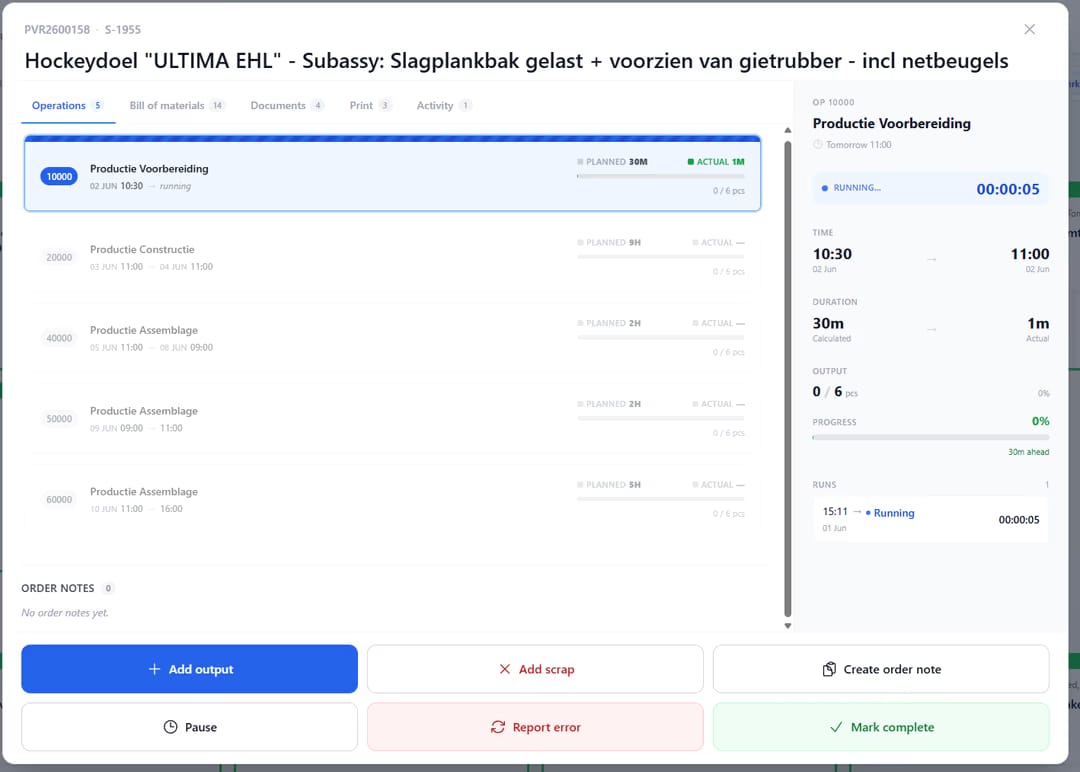
uShopfloor order detail screen for a production order, showing a list of six operations with planned versus actual time and output, a side panel timing the running "Productie Voorbereiding" operation with a live stopwatch, and action buttons to add output, add scrap, create an order note, pause, report an error, or mark complete.
Wann das wichtig ist

Anzeichen, dass du das brauchst.

01
Paper still runs the floor
When the shift starts with a stack of printed work orders, the system has already failed. Paper drifts; screens stay current.
02
Floor workers refuse the new system
When floor software requires a session in a meeting room, adoption is uphill. uShopFloor is designed so nobody needs that session.
03
Time and quantity are entered hours later
A 16:00 batch entry of 8 hours of work is fiction. Real-time entry is the only entry that reflects reality.
04
Issues live in a notebook
A machine issue jotted on paper at 10:00 is forgotten by 15:00. Capturing it in the moment closes the loop.
Häufige Fragen

Die Fragen, die alle zuerst stellen.

Noch Fragen? Frag uns direkt →

Any modern browser, on touch screens, ruggedised tablets (Zebra, Panasonic Toughbook) or standard PCs. We also publish native apps on the Google Play Store and the Apple App Store, so a worker can run uShopFloor on a standard Android or iPad tablet without the browser in the way. No proprietary hardware, no lock-in.

Sieh dir uShopFloor in einer 30-minütigen Demo an.

Eine echte Bildschirmfreigabe mit jemandem, der es gebaut hat. Keine Folien.

Die uTools-Suite

Weitere Apps, die gut zu uShopFloor passen